The best old photo restoration prompt does more than ask an AI to “restore this photo.” It tells the model what kind of damage to repair, what must stay unchanged, how natural the result should look, and which changes to avoid.
If you only need one prompt, use this: restore the damage, preserve the person’s identity, keep the original lighting and era, improve clarity gently, and avoid making the photo look modern, plastic, or invented.
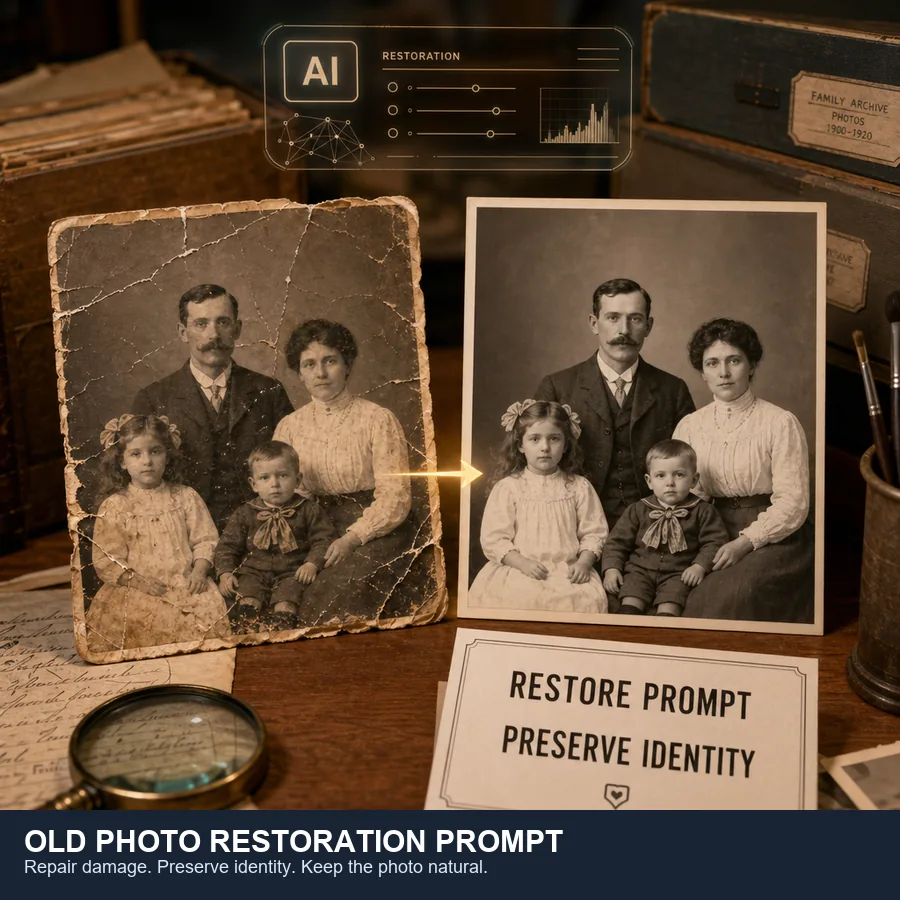
Table of Contents
- Best Universal Old Photo Restoration Prompt
- How to Write a Better Prompt for Old Photo Restoration
- ChatGPT Old Photo Restoration Prompts
- Gemini Old Photo Restoration Prompts
- Old Photo Restoration Prompts by Problem
- Prompts for Black-and-White and Old Colour Photos
- Prepare Your Photo Before Using an AI Prompt
- Common Prompt Mistakes That Change the Face
- Useful Sources for Prompt and Restoration Best Practices
- Frequently Asked Questions
- Use Prompts to Guide Restoration, Not Rewrite the Photo
Best Universal Old Photo Restoration Prompt
Start with a universal prompt when you want one reliable instruction for ChatGPT, Gemini, or another AI image editor. This version is intentionally conservative: it asks for restoration, not reinvention. That distinction matters because old family photographs often have emotional and historical value. A good old photo restoration AI prompt should repair damage while keeping the people recognizable.
Restore this old photograph naturally. Repair visible scratches, dust, stains, fading, tears, cracks, and mild blur while preserving the original person’s identity, facial features, expression, age, pose, clothing, lighting, and composition. Improve clarity and contrast gently. Keep realistic skin texture and original photographic character. Do not over-smooth, beautify, modernize, replace faces, change the background, alter clothing, or invent details that are not supported by the image.
This is the best prompt for old photo restoration when you are unsure where to begin. It covers the most common damage types, adds a clear identity-preservation rule, and includes negative constraints. The negative constraints are important because image models often interpret “restore” as “make better,” which can produce a face that looks cleaner but less like the original person.
For the safest result, keep your original scan unchanged. Save the AI-restored image as a new file so you can compare the output against the original later.
How to Write a Better Prompt for Old Photo Restoration
Old photo restoration is difficult because a single image can contain several kinds of degradation at once: scratches, dust, paper cracks, stains, faded contrast, color shift, blur, and missing image areas. Research on old photo restoration often separates structured damage such as scratches and dust from unstructured damage such as blur and noise. That is why a useful prompt should describe the visible problem instead of using one vague command.
- State the restoration goal: say whether you want repair, enhancement, color recovery, colorization, or all of them.
- Name the visible damage: mention scratches, stains, fading, tears, cracks, blur, or missing corners when you can see them.
- Protect identity: tell the model to preserve face shape, eyes, nose, mouth, expression, age, and proportions.
- Preserve the era: ask it to keep original clothing, background, lighting, grain, and historical character.
- Set a natural style: use words like realistic, gentle, archival, natural texture, and conservative restoration.
- Add negative constraints: tell it not to beautify, modernize, smooth skin too much, create a new background, or change the person.
The most useful prompt for professional restoration of old colour photo without changing identity is not the longest prompt. It is the clearest prompt. A long instruction full of cinematic language can push the model toward a dramatic remake. A concise instruction with firm boundaries usually works better for family portraits, genealogy images, wedding photos, military portraits, and archival scans.
ChatGPT Old Photo Restoration Prompts
ChatGPT is useful when you want the model to analyze the uploaded photo, reason about damage, and then apply a careful edit. OpenAI’s own image guidance recommends describing the subject, purpose, style, composition, lighting, and constraints clearly. For old photos, the most important constraints are identity preservation and conservative repair.
1. Basic ChatGPT Restoration Prompt
Please restore this old photo. Remove scratches, dust, cracks, stains, and fading. Improve sharpness and contrast naturally while preserving the original identity, expression, clothing, background, lighting, and vintage photo character. Do not make the person look younger, more modern, or artificially beautified.
2. Damage Assessment Prompt
First analyze this old photo and list the visible damage types, such as scratches, dust, stains, fading, blur, cracks, or missing areas. Then restore it conservatively by fixing only the damage and improving readability while preserving the original face, pose, clothing, lighting, and historical character.
3. Prompt for Old Colour Photo Without Changing Identity
Restore this old colour photo without changing identity. Correct faded colors, yellowing, stains, scratches, and low contrast. Keep the same face shape, eyes, nose, mouth, expression, age, hair, skin texture, clothing, and background. Use natural color balance, not modern HDR, not beauty retouching, and not a new interpretation of the person.
Use the damage assessment prompt when the photo is badly damaged or when you are unsure what to ask for. It makes the model identify the problem before editing, which often leads to a more controlled result. For portraits, the identity prompt should be your default because face drift is the most common failure mode.
Skip the Prompt Testing
If you want a restored result instead of experimenting with prompt variations, upload your photo and let the restoration tool handle it.
Restore Old Photos NowGemini Old Photo Restoration Prompts
Gemini prompts work best when the instruction is direct and the edit target is specific. Google’s prompt guidance for image generation and editing emphasizes clear subjects, composition, style, and editing instructions. For restoration, that means telling Gemini exactly which parts to repair and which parts to leave untouched.
Similarweb keyword generator shows strong demand for old photo restoration prompt Gemini and gemini old photo restoration prompt queries. Treat Gemini as a restoration editor, not a portrait generator: name the damage, define the archive style, and state exactly what must stay unchanged.
Gemini prompt variants worth testing:
- **Short Gemini prompt:** Restore this old photo naturally. Repair scratches, stains, fading, and blur while preserving the same face, age, expression, clothing, background, lighting, and vintage photo texture.
- **Family archive prompt:** Make a clean archive-quality restoration of this family photograph. Keep every person recognizable and avoid beautifying, de-aging, sharpening faces aggressively, or adding modern colors.
- **Severely damaged prompt:** Repair tears and missing paper only where nearby texture supports the reconstruction. If an area is uncertain, keep it subtle instead of inventing new objects or facial detail.
4. Gemini Quick Restoration Prompt
Restore this old family photograph in a natural archival style. Remove scratches, dust, stains, cracks, and fading. Improve facial clarity and overall contrast while preserving the original identity, pose, clothing, background, lighting, and time-period feel. Keep the result realistic and avoid over-smoothing.
5. Gemini Prompt for a Damaged Family Portrait
This is a damaged family portrait. Repair tears, cracks, missing edges, stains, dust, and faded areas. Reconstruct damaged background areas conservatively using nearby texture. Preserve every person’s face, age, expression, body position, clothing, and relationship to the original composition. Do not replace faces or add modern details.
6. Gemini Prompt with a Reference Photo
Image 1 is the damaged old photo. Image 2 is a clearer reference photo of the same person. Restore Image 1 using Image 2 only as identity reference. Keep the pose, clothing, background, age, lighting, and expression from Image 1. Use Image 2 to preserve facial structure, not to change the original photo.
The reference-photo version is helpful when the old image is scratched across the face. It gives Gemini more information about identity, but the prompt still has to prevent the model from copying the reference photo too aggressively.
Old Photo Restoration Prompts by Problem
A single prompt will work for many photos, but problem-specific prompts usually produce cleaner results. Choose the row that matches your image, then add the identity-preservation sentence from the universal prompt if people appear in the photo.
Prompt Focus by Restoration Problem
| Photo problem | Best prompt focus | Avoid asking for |
|---|---|---|
| Scratches and dust | Remove physical marks, blend surrounding texture, keep film grain | Plastic skin, heavy sharpening |
| Faded photo | Recover contrast, tonal range, and gentle clarity | Extreme saturation or modern HDR |
| Blurry face | Improve facial readability while preserving exact identity | Changing eyes, mouth, age, or expression |
| Torn photo | Repair tears and reconstruct missing areas conservatively | Inventing new background details |
| Black-and-white photo | Restore first, then optionally colorize with natural tones | Neon colors or modern fashion colors |
| Old colour photo | Correct color cast and fading while keeping original palette | Turning it into a contemporary portrait |
The best old damaged photo restoration prompt is specific about the damage and cautious about identity.
7. Scratch and Dust Removal Prompt
Remove scratches, dust spots, emulsion cracks, and surface marks from this old photo. Blend repairs with nearby texture and grain. Preserve all original facial features, clothing, background details, lighting, and composition. Do not over-sharpen or smooth the image.
8. Faded Photo Prompt
Restore this faded old photo by gently improving contrast, tonal balance, and clarity. Recover faded details where possible while keeping a natural vintage look. Avoid high saturation, HDR contrast, modern colors, or artificial sharpness.
9. Torn or Missing Area Prompt
Repair the torn and missing areas of this old photograph conservatively. Reconstruct only what is strongly supported by nearby patterns, edges, clothing, or background texture. Keep the original composition and do not invent new objects, faces, or scenery.
Prompts for Black-and-White and Old Colour Photos
Restoration and colorization are related but not identical. Restoration tries to recover visible information. Colorization adds plausible color where the original image may not contain color data. If historical accuracy matters, keep an uncolorized restored copy as your archival version and treat the colorized image as an interpretation.
10. Black-and-White Photo Colorization Prompt
Restore and colorize this black-and-white old photo naturally. First repair scratches, dust, fading, and blur. Then add historically plausible, subtle colors based on the era, clothing, skin tone, and environment. Preserve the original identity, expression, lighting, and composition. Avoid bright modern colors or a painted look.
11. Old Colour Photo Repair Prompt
Restore this old colour photograph. Correct yellowing, color fading, stains, scratches, and uneven exposure. Keep the original color mood and time-period feel. Improve clarity gently without turning the image into a modern digital portrait.
If your main goal is color work rather than general repair, use a dedicated old photo colorizer. If the image is scratched or torn, restore the damage first, then colorize. That order usually gives the model cleaner edges and better face detail.
Prepare Your Photo Before Using an AI Prompt
Prompt quality matters, but input quality matters just as much. A low-resolution screenshot gives the AI fewer real details to preserve, increasing the chance that it will invent facial features or textures. The U.S. National Archives recommends careful handling and keeping original materials safe when digitizing family archives, while digitization standards from institutions such as the Smithsonian commonly use high-resolution, preservation-friendly files.
If you prefer a local node-based setup instead of prompt editing, follow our ComfyUI old photo restoration workflow. It explains how to combine damage repair, face restoration, upscaling, and optional colorization while preserving identity.
Before uploading an old photo, do this:
- Use a flatbed scanner when possible, especially for fragile family prints.
- Scan standard photos at around 600 DPI when you want enough detail for restoration.
- Use color mode even for black-and-white photos because it captures paper tone and stains.
- Save a lossless master file such as PNG or TIFF before making edited versions.
- Avoid uploading compressed screenshots from messaging apps.
- Keep the original physical photo safe; do not clean it with household liquids.
If you want a simpler workflow, upload the scan directly to our AI old photo restoration tool. A specialized tool is often easier than prompt-tuning when your goal is to fix a photo quickly rather than experiment with different models.
Distinct searches such as Gemini prompt to restore old photos are strong enough to deserve a future dedicated page, but this update keeps them as supporting variants here so the current prompt guide remains the canonical page for prompt intent.
Common Prompt Mistakes That Change the Face
The most frustrating restoration failure is a photo that looks technically clean but emotionally wrong. The eyes are different. The person looks younger. The smile changes. This usually happens because the prompt asks for enhancement without setting identity boundaries.
Avoid these prompt mistakes:
- Only writing “restore this photo”: too vague, especially for portraits.
- Asking for “4K cinematic”: often creates a modern portrait instead of a restored old photograph.
- Requesting beauty retouching: can change age, skin texture, and facial proportions.
- Combining too many tasks: repair, colorize, upscale, change clothes, and replace background in one prompt is risky.
- Ignoring the input scan: a weak scan can force the model to guess important details.
- Forgetting negative constraints: always say what should not change.
12. Identity Protection Add-On Prompt
Preserve the original identity exactly: keep the same face shape, eyes, nose, mouth, expression, age, hairline, facial proportions, pose, clothing, lighting, and background. Do not beautify, replace, modernize, de-age, stylize, or reinterpret the person. Restore only damage, clarity, and tonal balance.
Add this identity protection prompt to any restoration prompt involving a portrait, especially wedding photos, military portraits, school portraits, and family group photos.
Useful Sources for Prompt and Restoration Best Practices
For image editing prompts, Google’s Gemini image prompting tips and Gemini 2.5 Flash Image prompting guide are useful references because they emphasize clear subjects, style, and editing instructions.
For ChatGPT image work, OpenAI’s image generation guide and image editing help article support the same practical lesson: describe the image, the intended edit, and the constraints. For old photos, the constraints are the difference between restoration and reinvention.
For the technical background of old photo degradation, the paper Old Photo Restoration via Deep Latent Space Translation is useful because it explains why old photo damage is more complex than ordinary noise removal.
Frequently Asked Questions
Use Prompts to Guide Restoration, Not Rewrite the Photo
A good old photo restoration prompt should feel respectful. It should repair the damage that time left behind without replacing the people, the era, or the emotional truth of the picture. Start with the universal prompt, add the identity protection sentence for portraits, and use problem-specific instructions for scratches, fading, tears, or color work. When prompt tuning becomes tedious, use a purpose-built old photo restoration tool and let the model handle the repair directly.

Sarah Mitchell, Lifestyle & Family Heritage Writer
Sarah writes about family photo preservation, AI restoration, and practical ways to protect visual memories. She focuses on workflows that ordinary families can use without professional editing software.