Old photo restoration works best when you treat the photo as both an image file and a family record. Start with a clean scan, identify the damage type, repair scratches and tears first, restore faces conservatively, then enhance or colorize only after the structure is clean.
If you only remember one thing: scan carefully, keep the original file, and use the least aggressive AI setting that fixes the damage without changing the person.
Table of Contents
- What is Old Photo Restoration?
- Old Photo Restoration Workflow for Damaged Family Photos
- AI Photo Restoration Techniques That Preserve Identity
- AI Photo Restoration Technique Matrix: Match the Fix to the Damage
- When to Use AI Techniques, Prompts, Photoshop, or a Dedicated Tool
- How to Restore Old Damaged Photographs Without Losing Detail
- Why Should You Restore Old Photos?
- Traditional Photo Restoration vs AI Photo Restoration
- How AI Photo Restoration Works
- Step-by-Step Guide: How to Restore Old Photos with AI
- Best Practices for Old Photo Restoration
- Common Old Photo Restoration Challenges and Solutions
- Free vs Paid Photo Restoration Services
- Preserving Your Restored Photos
- How to Choose the Best Photo Restoration Service
- Cost Comparison: AI vs Traditional Photo Restoration Services
- Best Photo Restoration Tools and Software in 2025
- Real Photo Restoration Case Studies and Success Stories
- Technical Considerations for Old Photo Restoration
- Your Family's Story Deserves to Be Preserved
What is Old Photo Restoration?
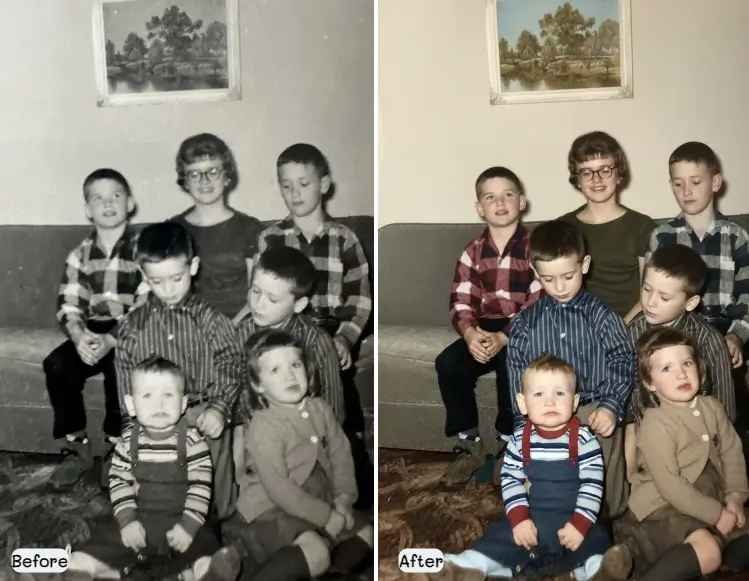
The transformation can be truly breathtaking - this 1940s family portrait went from barely recognizable to beautifully preserved
Picture this: you're flipping through your family's photo albums when you come across a picture that makes your heart skip a beat. Maybe it's your parents on their first date, or your grandfather in his military uniform. But instead of the crisp, clear image you'd love to frame, you're looking at something that's faded, torn, or stained beyond recognition.
Old photo restoration is like giving these treasured memories a second chance at life. It's the art and science of repairing damage that time has inflicted on our most precious photographs. Think of it as a gentle healing process for images that have weathered decades of storage in less-than-ideal conditions.
Common Types of Photo Damage That Can Be Restored:
- Fading and color degradation from age
- Physical tears and rips in the photograph
- Water damage and staining
- Scratches and surface damage
- Missing corners or sections
- Discoloration and yellowing
- Dust spots and debris marks
- Cracking and brittleness damage
Old Photo Restoration Workflow for Damaged Family Photos
For most damaged family photos, the best workflow is not one dramatic enhancement pass. Use a staged process: capture a high-quality scan, remove surface damage, repair missing or torn areas, restore facial detail lightly, then adjust contrast and color. This order keeps the photo recognizable while improving the parts that make it hard to view or print.
Recommended restoration order
| Step | What to fix | Best tool page |
|---|---|---|
| 1 | Dust, scratches, cracks, and fold lines | Remove scratches from photos |
| 2 | Blur, low contrast, and soft facial detail | Old photo enhancer |
| 3 | Black-and-white source that needs color | Colorize old photos |
| 4 | Severe tears or missing corners | Repair damaged photos |
Clean physical damage before enhancement or colorization so later AI steps do not amplify scratches.
This workflow targets the query old photo restoration directly because it explains what to do, in what order, and which type of repair belongs to each stage.
AI Photo Restoration Techniques That Preserve Identity
Good AI photo restoration techniques are conservative. They repair damage while protecting the identity of the person in the photo. Use scratch removal for thin surface lines, inpainting-style repair for missing paper, face restoration only when eyes and mouth are still readable, and upscaling after cleanup rather than before.
Use the right technique for the damage:
- Scratch removal for dust lines, cracks, and fold marks
- Face restoration for soft but still recognizable portraits
- Deblur or enhancer tools for camera shake and low-resolution scans
- Colorization only after the black-and-white image is clean
- Manual review for military uniforms, handwritten notes, jewelry, and historically important details
When the original face is heavily damaged, avoid strong creative settings. A realistic-looking face is not always the same person. For family archive work, fidelity matters more than cosmetic perfection.
For a deeper method-by-method decision guide, see AI photo restoration techniques before applying stronger face repair or colorization.
AI Photo Restoration Technique Matrix: Match the Fix to the Damage
The fastest way to improve an old photo is to choose the narrowest repair that solves the visible problem. A scratched print, a faded portrait, and a soft scan should not receive the same AI treatment. This matrix helps you preserve identity while still improving the photo enough for sharing, printing, or archiving.
Technique selection matrix for old photo restoration
| Photo problem | Best first technique | What to avoid | Helpful next page |
|---|---|---|---|
| Thin scratches, dust, fold lines | Scratch removal before any face enhancement | Colorizing first, because damaged lines may receive false color | Remove scratches from photos |
| Faded black-and-white portrait | Contrast recovery and gentle face restoration | Strong beautification that changes the person | Old photo enhancer |
| Clean black-and-white photo needing color | Colorization after cleanup | Treating predicted colors as a confirmed historical record | Colorize old photos |
| Missing corners, torn paper, stains | Damage repair or inpainting-style restoration | Cropping away context that can guide reconstruction | Repair damaged photos |
Use the smallest useful AI restoration step first, then compare the result with the original scan at 100% zoom.
If the image has family, legal, military, or archive value, keep the unedited scan and export each restoration attempt separately. A good AI result should make the original easier to see; it should not replace the source record.
When to Use AI Techniques, Prompts, Photoshop, or a Dedicated Tool
Search behavior now splits between restore old photos, AI photo restoration techniques, prompt to restore old photos, and how to restore old images in Photoshop. The safest answer is not one universal method. Use a dedicated restoration tool for fast family-photo cleanup, a prompt guide when you want to control ChatGPT or Gemini, and Photoshop-style manual repair when the photo has archive value or uncertain missing detail.
If you are using prompts, keep them narrow. Ask the model to repair visible damage and preserve identity, then run colorization or sharpening as a separate step. For full prompt examples, use the old photo restoration prompt guide; this article keeps the broader workflow and technique order in one place.
Choose the restoration path by intent
| Search intent | Best existing page | Use this page for |
|---|---|---|
| Restore old photos quickly | AI restoration tool | Upload, repair, review, and download a cleaner family photo. |
| AI photo restoration techniques | This guide | Choose scratch removal, inpainting, face repair, enhancement, or colorization in the right order. |
| Prompt to restore old photos | Prompt guide | Copy ChatGPT/Gemini prompts and identity-protection wording. |
| Photoshop or manual archive work | This guide + professional editor | Handle uncertain missing areas, historically important prints, or complex composites. |
Choose the restoration path by intent
Common questions before you restore old photos
- **How do I restore old photos with ChatGPT?** Use ChatGPT only with a clear identity-preservation prompt and a good scan. Ask it to repair visible damage first, then evaluate the result before asking for color or stronger enhancement.
- **Can Photoshop restore old images better than AI?** Photoshop gives more manual control for rare, legal, or archive photos, but AI is faster for common scratches, fading, blur, and family-photo cleanup.
- **Should I colorize before or after restoration?** Restore scratches, tears, dust, and fading first. Colorize only after the cleaned black-and-white or faded source is stable.
How to Restore Old Damaged Photographs Without Losing Detail
To restore old damaged photographs, start by separating physical damage from image-quality problems. Physical damage includes scratches, tears, stains, missing corners, and paper cracks. Image-quality problems include fading, blur, low contrast, yellowing, and grain. Each group needs a different fix.
If the photograph is fragile, photograph or scan it before cleaning the physical print. Do not press cracked paper hard against scanner glass. A phone capture in indirect daylight can be safer than forcing a brittle print flat.
Quick checklist before uploading:
- Save the unedited scan as your archive master
- Crop only after restoration so edges can guide repair
- Choose fidelity mode when faces, uniforms, or handwriting matter
- Compare before and after at 100% zoom
- Print a small test copy before ordering large prints
Why Should You Restore Old Photos?
Last Christmas, I surprised my mother with a restored version of her childhood photo with her siblings. When she opened the frame, tears welled up in her eyes. "I thought this memory was lost forever," she whispered. That moment reminded me why photo restoration is so much more than just fixing old pictures—it's about preserving the stories that make us who we are.
Keeping Family Stories Alive
Every family photo tells a story. That blurry image of your great-aunt's wedding? It captures a moment of pure joy that deserves to be seen clearly. When we restore these photos, we're not just fixing pixels—we're ensuring that future generations can connect with their roots and understand where they came from.
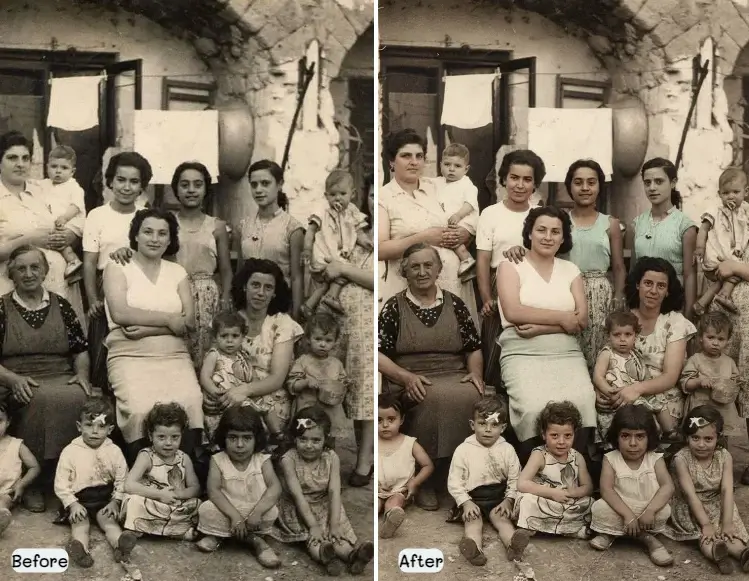
Each restored photo becomes a bridge connecting past and present, allowing stories to flow from one generation to the next
Improve Photo Quality for Digital Archives
Restored photos scan and digitize much better than damaged originals. AI photo restoration can enhance image quality, making them perfect for creating digital family archives, sharing on social media, or printing new copies for relatives.
Create Meaningful Gifts and Keepsakes
Restored old photos make incredibly meaningful gifts for family reunions, anniversaries, or memorial services. A beautifully restored vintage family portrait can become a treasured centerpiece in any home.
Traditional Photo Restoration vs AI Photo Restoration
Understanding the differences between traditional and AI photo restoration methods helps you choose the best approach for your vintage photographs.
Traditional Photo Restoration Methods
Traditional photo restoration involves skilled professionals using software like Adobe Photoshop to manually repair damaged areas. This process requires extensive knowledge of photo editing techniques, color theory, and artistic skills to recreate missing portions of photographs.
Traditional Restoration Characteristics:
- Requires professional photo editing skills
- Time-intensive process (hours to days per photo)
- Expensive professional services ($50-$500+ per photo)
- Highly customizable and detailed work
- Best for extremely valuable or complex restorations
AI Photo Restoration Technology
AI old photo restoration uses machine learning algorithms trained on millions of photographs to automatically detect and repair damage. These systems can analyze photo damage patterns and apply appropriate restoration techniques without human intervention.
AI Restoration Advantages:
- Instant results in seconds
- No photo editing skills required
- Cost-effective for multiple photos
- Consistent quality across all restorations
- Available 24/7 online
- Handles most common damage types automatically
How AI Photo Restoration Works
Modern AI photo restoration technology uses sophisticated deep learning algorithms to analyze and repair damaged photographs. Understanding this process helps you get the best results from AI restoration tools.
Step 1: Damage Detection and Analysis
The AI system first scans your old photo to identify different types of damage including tears, stains, fading, and missing areas. Advanced computer vision algorithms can distinguish between intentional photo elements and damage that needs repair.
Step 2: Pattern Recognition and Reconstruction
Using training data from millions of photographs, the AI identifies patterns in your image and predicts what damaged areas should look like. This includes reconstructing missing facial features, clothing details, and background elements.
Step 3: Color Restoration and Enhancement
The AI analyzes color patterns throughout the photograph to restore faded colors and correct discoloration. It can even colorize black and white photos based on contextual clues and historical color data.
Step 4: Quality Enhancement and Finishing
Finally, the AI applies enhancement techniques to improve overall image quality, including sharpening details, reducing noise, and optimizing contrast for the best possible restoration result.
Step-by-Step Guide: How to Restore Old Photos with AI
When I first started restoring family photos, I was intimidated by the technical aspects. But here's what I've learned: it doesn't have to be complicated! Let me share the simple process I use that has transformed hundreds of my family's precious memories.
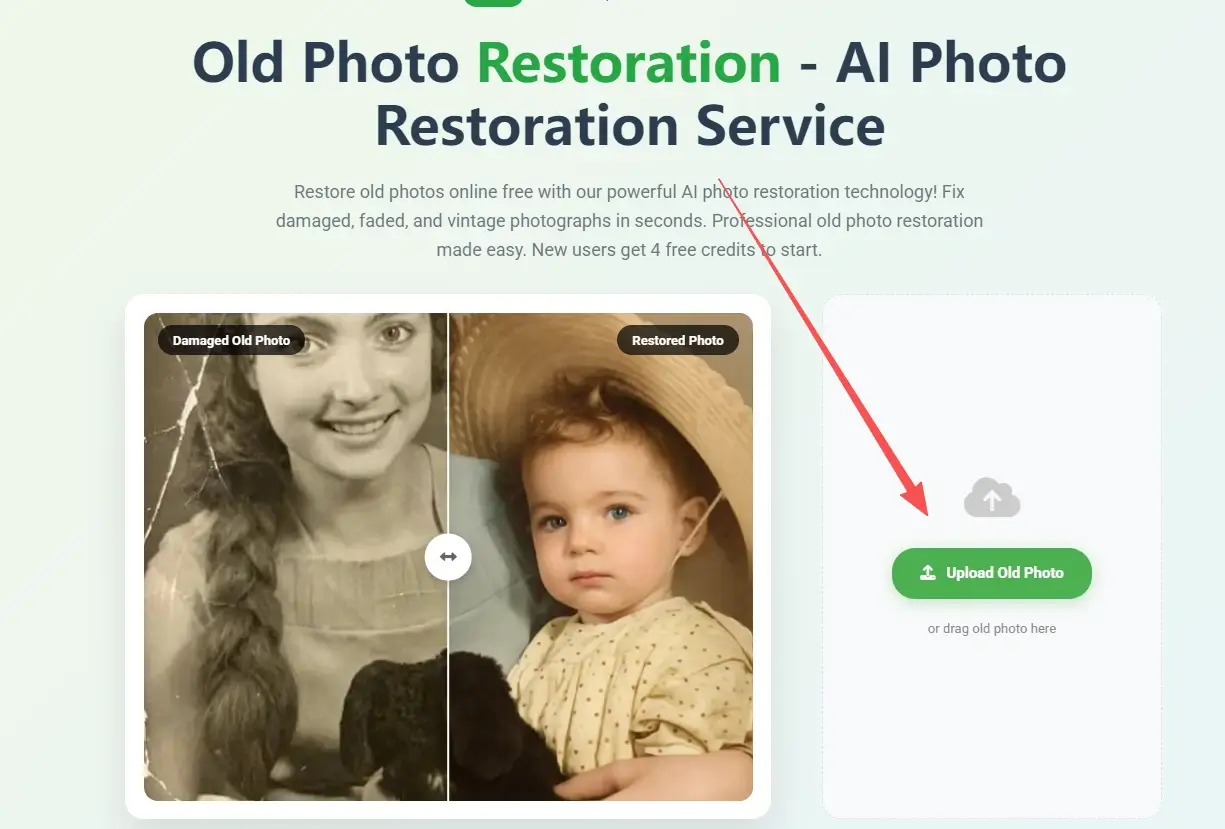
The restoration journey: from discovering a damaged photo to celebrating the beautiful final result
Step 1: Handle Your Photos with Love
First things first—treat your old photos like the treasures they are. I always wash my hands before handling vintage photographs and work in good lighting. Gently brush away any surface dust with a soft, clean cloth. If you're scanning, make sure your scanner glass is spotless. I've learned that taking a few extra minutes here makes all the difference in the final result.
Photo Preparation Tips:
- Scan at 600 DPI or higher for detailed restoration
- Save in uncompressed formats (TIFF or PNG preferred)
- Ensure good lighting when photographing with a camera
- Keep the original photo flat during scanning
- Remove any glass or frames before scanning
Step 2: Find Your Perfect Restoration Partner
After trying various services over the years, I've found that the best photo restoration tools feel intuitive and produce results that honor the original photo's character. Our AI photo restoration service has become my go-to choice because it understands the delicate balance between fixing damage and preserving the authentic vintage feel that makes old photos so special.
Step 3: Watch the Magic Happen
This is honestly my favorite part of the process! Once you upload your photo, the restoration begins almost instantly. I love watching as tears disappear, colors brighten, and faces become clear again. It's like watching decades of damage melt away, revealing the beautiful memory that was always there, just waiting to be rediscovered.
Step 4: Review and Download Results
Once processing is complete (usually within seconds), review the restored photo carefully. Check that facial features look natural, colors appear realistic, and all major damage has been addressed. Download the high-resolution restored image.
Step 5: Save and Share Your Restored Photo
Save multiple copies of your restored photo in different formats. Create backups in cloud storage and consider printing copies for family members. Your restored vintage photograph is now ready to be shared and preserved for future generations.
Best Practices for Old Photo Restoration
Over the years, I've learned some valuable lessons about photo restoration—sometimes the hard way! Here are the insider tips that have made the biggest difference in my restoration projects.
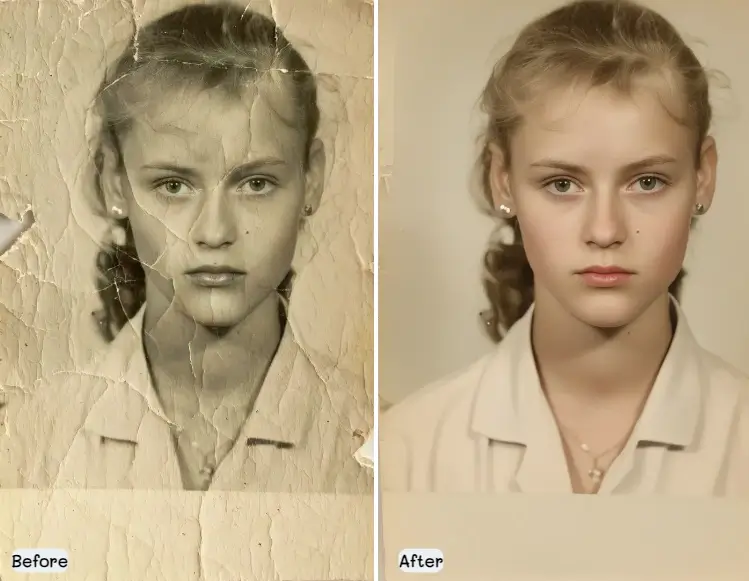
The difference quality scanning makes is remarkable—it's worth taking the time to do it right
The Art of Perfect Scanning
I used to think any old scan would do, but I quickly learned that the quality of your digital copy makes or breaks the restoration. Now I always scan at high resolution—it's like giving the restoration software more information to work with. Think of it as the difference between trying to restore a photo while squinting versus having perfect vision.
My Go-To Scanning Setup:
- Use a flatbed scanner (I swear by mine—it's been my faithful companion for years)
- Scan at 600-1200 DPI (yes, it takes longer, but trust me on this)
- Save in TIFF format for the best quality (JPEG compresses too much)
- Wear cotton gloves when handling delicate photos
- Clean that scanner glass until it sparkles
- Use only photo-safe cleaning materials (learned this the hard way!)
Choosing the Right Restoration Approach
Different types of damage require different restoration approaches. Minor fading and small scratches work well with AI restoration, while severely damaged or historically significant photos may benefit from professional traditional restoration.
When to Use AI Photo Restoration:
- Family photos with typical age-related damage
- Multiple photos needing similar repairs
- Budget-conscious restoration projects
- Quick turnaround requirements
- Standard fading, scratches, and minor tears
When to Consider Professional Restoration:
- Historically significant photographs
- Severely damaged photos missing large sections
- Photos requiring artistic interpretation
- Valuable family heirlooms
- Complex damage requiring manual attention
Common Old Photo Restoration Challenges and Solutions
Let me share some of the trickiest restoration challenges I've encountered and how I've learned to tackle them. Every damaged photo tells a story, and sometimes that story includes some pretty dramatic plot twists!
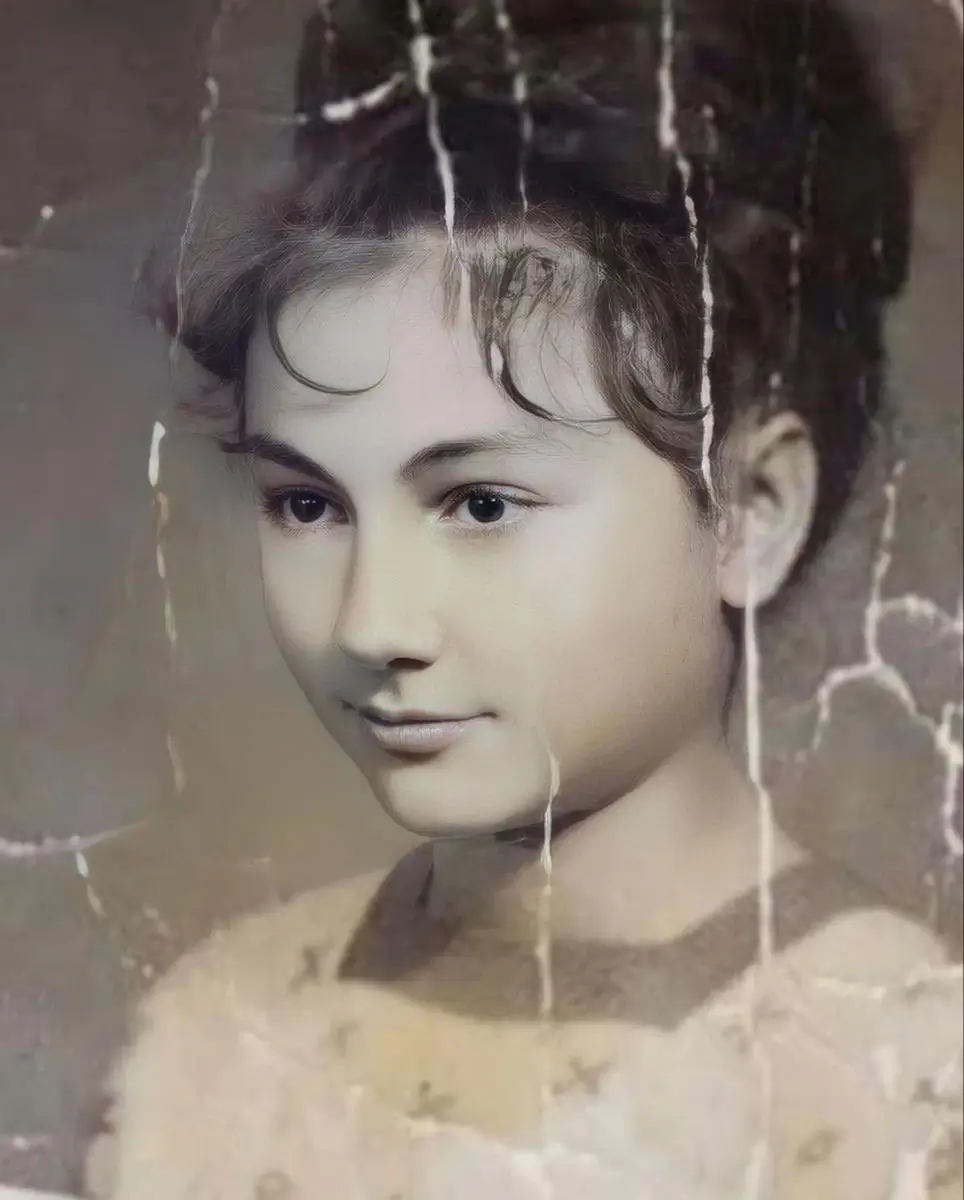
These photos looked hopeless when I first found them, but each one had a beautiful story waiting to be revealed
When Colors Fade to Whispers
I once found a photo of my grandmother's 1950s garden party that had faded so much it looked like a ghost of its former self. The vibrant summer dresses had turned to pale shadows, and the lush garden was barely visible. But here's the amazing thing about modern AI restoration—it can actually 'remember' what those colors should have been based on the tiny traces that remain. It's like having a detective that specializes in color mysteries!
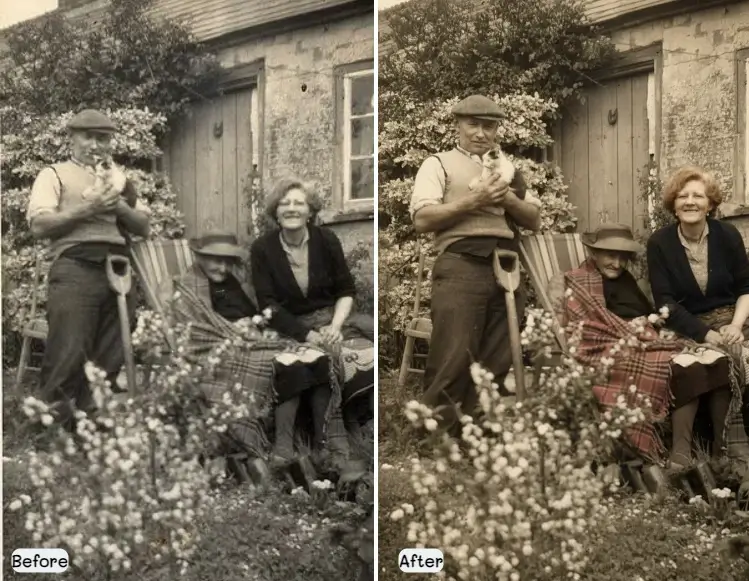
My grandmother's 1950s garden party photo - from faded ghost to vibrant memory. The AI restoration brought back the beautiful summer colors and garden details that were nearly lost forever.
Large Tears and Missing Sections
Photos with significant missing areas require the AI to reconstruct content based on surrounding context. Modern AI systems can intelligently fill missing faces, clothing, and background details with remarkable accuracy.
Water Damage and Staining
Water damage often creates complex staining patterns that can be challenging to remove. AI restoration can identify and remove most water stains while preserving the original photo content underneath.
Multiple Damage Types
Photos with multiple types of damage (tears + fading + stains) require comprehensive restoration approaches. Advanced AI systems can handle multiple damage types simultaneously for complete photo restoration.
Free vs Paid Photo Restoration Services
Understanding the differences between free and paid photo restoration services helps you choose the right option for your vintage photograph restoration needs.
Free AI Photo Restoration Options
Many platforms offer free old photo restoration online with basic features. These services typically provide lower resolution outputs, may include watermarks, and have limited processing capabilities.
Free Service Limitations:
- Lower resolution output images
- Watermarks on restored photos
- Limited processing time per photo
- Basic restoration capabilities only
- No customer support
- Usage restrictions
Premium Photo Restoration Services
Paid services offer advanced AI restoration capabilities, high-resolution outputs, and additional features for professional-quality results. These services are ideal for important family photos or professional archival work.
Premium Service Benefits:
- High-resolution restored photos
- No watermarks or restrictions
- Advanced AI restoration algorithms
- Multiple output formats
- Customer support and guidance
- Batch processing capabilities
- Commercial usage rights
Preserving Your Restored Photos
After successfully restoring your old photos, proper preservation ensures these precious memories remain protected for future generations.
Digital Preservation Strategies
Create multiple digital copies of your restored photos in different formats and store them in various locations. This redundancy protects against data loss and ensures long-term accessibility.
Digital Storage Best Practices:
- Save in multiple formats (TIFF, PNG, JPEG)
- Store copies in cloud services (Google Drive, Dropbox)
- Create local backups on external drives
- Use descriptive filenames with dates
- Organize in clearly labeled folders
- Update storage media every 5-10 years
Physical Print Preservation
Consider printing restored photos using archival-quality materials for physical preservation. High-quality prints can last decades when properly stored and displayed.
Print Preservation Tips:
- Use archival-quality photo paper
- Choose fade-resistant inks
- Frame with UV-protective glass
- Store in acid-free albums
- Avoid direct sunlight exposure
- Maintain stable temperature and humidity
How to Choose the Best Photo Restoration Service
Selecting the right photo restoration service is crucial for getting the best results with your precious vintage photographs. Consider these factors when evaluating different options.
Key Features to Look For
Essential Service Features:
- High-resolution output options
- Multiple damage type support
- Fast processing times
- No watermarks on results
- Secure file handling
- Customer support availability
- Reasonable pricing structure
- User-friendly interface
Quality and Reliability Indicators
Look for services with proven track records, positive user reviews, and transparent pricing. The best AI photo restoration services showcase before/after examples and provide clear information about their restoration capabilities.
Security and Privacy Considerations
Since you're uploading personal family photos, ensure the service has strong privacy policies and secure file handling procedures. Your restored photos should be protected and not used for other purposes without permission.
Cost Comparison: AI vs Traditional Photo Restoration Services
When I started my photo restoration journey, I was shocked by how much traditional restoration services cost. As someone who had boxes of family photos to restore, I needed to find a more budget-friendly approach. Here's what I discovered about the real costs involved.
Cost Comparison: Traditional vs AI Photo Restoration
| Service Type | Price Range | Time Required | Quality | Best For |
|---|---|---|---|---|
| Traditional Hand Restoration | $50-$200 per photo | 1-3 weeks | Excellent for complex damage | Severely damaged or historically significant photos |
| Professional Digital Editing | $25-$100 per photo | 3-7 days | High quality, customizable | Photos requiring artistic interpretation |
| AI Photo Restoration | $0.20-$0.50 per photo | Seconds | Excellent for common damage | Bulk restoration, quick results |
| DIY Software | $0-$50 (one-time) | Hours to days | Varies by skill level | Learning experience, budget-conscious |
The cost difference was eye-opening—AI restoration made it possible for me to restore my entire family collection
Traditional Photo Restoration Costs
When I first called a traditional photo restoration service, I nearly dropped the phone. $200 for a single photo? For someone with three shoeboxes full of family memories, that would have cost me thousands! I quickly realized I needed to explore other options, which led me to discover the wonderful world of AI restoration.
Traditional Service Pricing Factors:
- Extent of photo damage (minor scratches vs major tears)
- Size and resolution requirements
- Turnaround time (rush jobs cost more)
- Specialist expertise and reputation
- Geographic location of service provider
- Additional services (colorization, enhancement)
AI Photo Restoration Pricing
AI old photo restoration services offer significantly more affordable options, with many platforms providing free basic restoration and premium credit-based systems. Our service uses a credit system where 2 credits restore 1 photo, with starter packs beginning at $9.99 for 100 credits (50 restorations), making it just $0.20 per photo.
AI Service Cost Benefits:
- Free basic restoration with watermarks
- Premium credit packs: Starting at $9.99 for 100 credits (50 photos)
- Bulk processing discounts available
- No geographic limitations or shipping costs
- Instant results save time and money
- Try before you buy with free samples
Best Photo Restoration Tools and Software in 2025
After years of experimenting with different tools and services, I've become something of a photo restoration tool connoisseur. Let me share my honest reviews of the platforms I've tried—the good, the not-so-good, and the absolutely amazing.
I've also found some incredible resources in the photo restoration community. The folks over at r/estoration on Reddit are incredibly helpful and share amazing before-and-after examples that never fail to inspire me. It's a wonderful community of people who understand the emotional value of preserving family memories.
Top AI Photo Restoration Platforms
Modern AI photo restoration platforms offer user-friendly interfaces and powerful algorithms trained specifically for old photo restoration. These services excel at handling common damage types found in vintage family photographs.
Technical users who want local control can also use ComfyUI old photo restoration workflows for custom node graphs, face restoration, tiled upscaling, and optional colorization. This approach takes more setup than an online tool, but it gives more control over identity preservation and batch processing.
Leading AI Restoration Services:
- Old Photo Restoration - Specialized in vintage family photos with advanced AI algorithms
- MyHeritage In Color - Focuses on colorizing black and white photos
- Remini - Mobile-first AI enhancement for old photos
- VanceAI - Professional-grade AI photo restoration tools
- Photomyne - Family photo digitization and restoration
Professional Photo Editing Software
For users who prefer manual control over the restoration process, professional photo editing software provides comprehensive tools for detailed old photo restoration work.
Professional Software Options:
- Adobe Photoshop - Industry standard with advanced restoration tools
- GIMP - Free alternative with powerful restoration capabilities
- Affinity Photo - Professional editing at affordable price
- Corel PaintShop Pro - User-friendly with restoration-specific features
- Luminar Neo - AI-assisted manual editing tools
Real Photo Restoration Case Studies and Success Stories
Let me tell you about some of my most memorable restoration projects. Each one taught me something new and reminded me why I'm so passionate about preserving family memories. These aren't just technical success stories—they're about bringing families back together with their history.
The Basement Flood Miracle
My neighbor Maria came to me in tears after her basement flooded. Her grandmother's 1940s family portrait—the only photo she had of her great-grandparents together—was completely water-damaged. The staining covered most of the faces, and I honestly wasn't sure if anything could be saved. But when I uploaded it to our restoration service, the results were nothing short of miraculous. The AI not only removed the water stains but actually reconstructed the missing facial details so beautifully that Maria's great-grandmother seemed to smile at us from across the decades.
Case Study 2: Torn Wedding Photo from 1920s
An antique wedding photograph with multiple tears across the bride's dress and groom's face required careful restoration. The AI system analyzed surrounding fabric patterns and facial features to seamlessly repair the damage, creating a beautiful restored image suitable for reprinting and framing.
Case Study 3: Faded Color Photos from 1970s
A collection of 1970s family vacation photos had severely faded colors and yellowing from improper storage. AI photo restoration analyzed the remaining color information and historical color palettes to restore vibrant, natural-looking colors while maintaining the authentic feel of the era.
Technical Considerations for Old Photo Restoration
Understanding the technical aspects of photo restoration helps you achieve better results and make informed decisions about digitization, file formats, and restoration approaches.
Optimal Scanning Resolution and Settings
The quality of your digital scan directly impacts restoration results. Higher resolution scans provide more detail for AI algorithms to work with, resulting in better restoration outcomes.
Recommended Scanning Specifications:
- Resolution: 600-1200 DPI for standard photos
- Color depth: 48-bit color for maximum information
- File format: TIFF uncompressed for archival quality
- Color space: Adobe RGB or ProPhoto RGB
- Dust removal: Use scanner's built-in dust removal
- Multiple scans: Scan important photos multiple times
File Format Considerations
Choosing the right file formats for different stages of the restoration process ensures maximum quality preservation and compatibility with various restoration tools.
File Format Best Practices:
- TIFF - Best for archival storage and professional editing
- PNG - Good for web sharing without compression loss
- JPEG - Suitable for final sharing but avoid for editing
- RAW - If available from scanner, preserves maximum data
- PSD - For Photoshop projects with layers
Your Family's Story Deserves to Be Preserved
Restoring old photos is a careful sequence, not a single filter. Scan the photo well, repair scratches and tears first, protect the original face, then enhance or colorize only when the cleaned version is stable. For quick family-photo projects, start with the focused AI tools for scratch removal, enhancement, repair, and colorization. For rare or historically important prints, keep the original scan and consider manual review after the AI draft.

Sarah Mitchell, Lifestyle & Family Heritage Writer
Sarah is a lifestyle writer and family heritage enthusiast who has spent over 5 years helping families preserve their precious memories through photo restoration. After discovering boxes of damaged family photos in her grandmother's attic, she became passionate about the intersection of technology and family history. Sarah has restored over 1,000 family photographs and regularly shares her expertise through workshops and online communities.